
Home › Forums › Voltage Regulator Support › Did I destroy the 200310 serial port?
-
AuthorPosts
-
 Sidney
February 6, 2022 at 4:57 amPost count: 0
Sidney
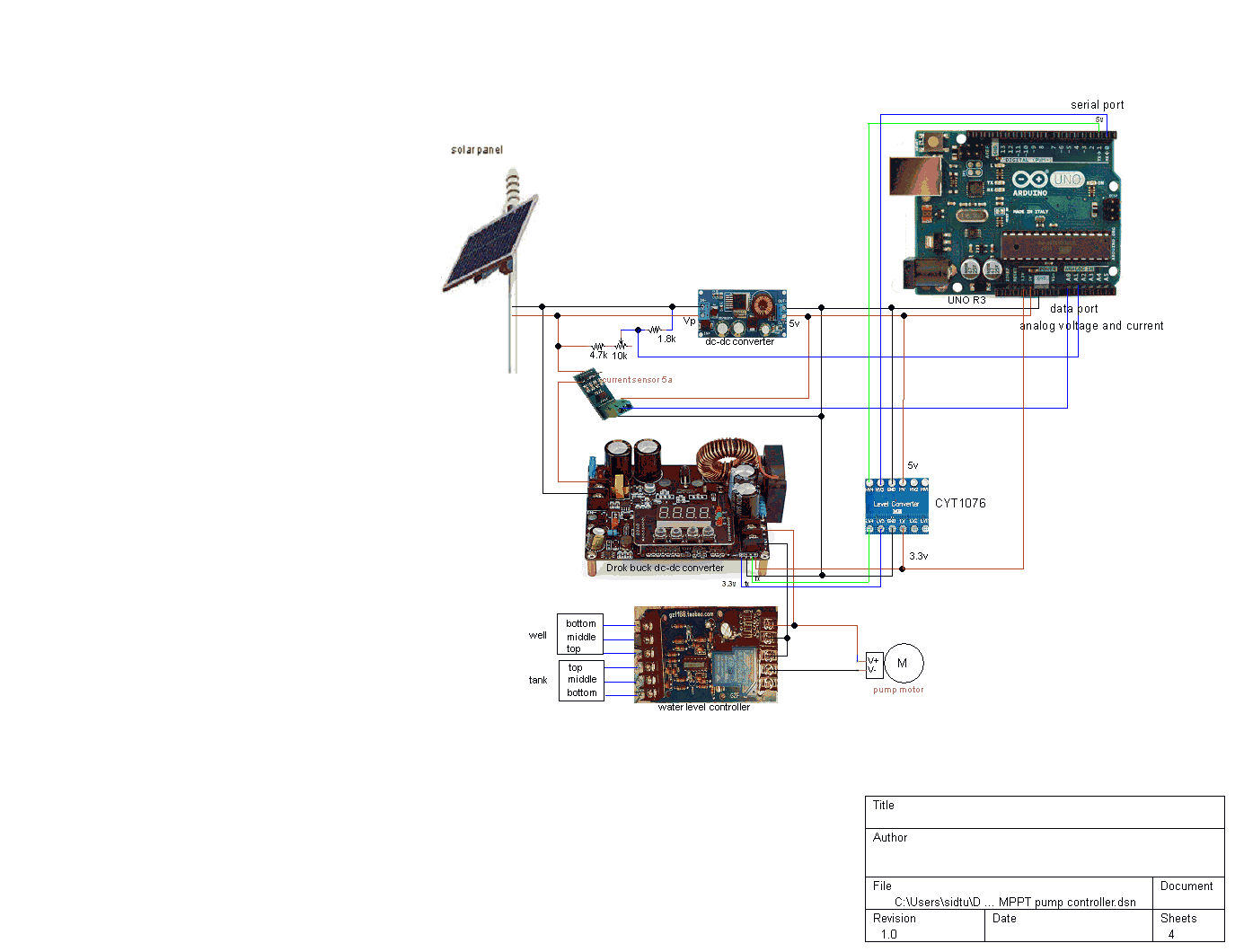
February 6, 2022 at 4:57 amPost count: 0I’m trying to control a 200310 DC-DC with a Uno R3. The Drok converter serial port uses 3.3v logic and the Uno serial lines use 5v. Stupidly I connected them directly and of course I couldn’t get a response from the Drok to commands from the Uno. Then I connected the two serial ports through a bi-directional level shifter (cyt1076), but I still don’t see any activity of the RX led of the Uno. Strangely on the Arduino software serial monitor I now see “0” values returned from the Drok where before there was nothing. I’ve tried swapping the TX/RX lines.
I’m using the library and example at https://github.com/bengineer19/BuckPSU
Did I destroy the Drok serial port with the 5v mistake? Please suggest a next step. Thanks.
Sidney
February 9, 2022 at 8:24 pmPost count: 0Thanks for responding. Yes, I’m using 9600 baud. Here is the Arduino test script which attempts to control the dc-dc converter:
#include <BuckPSU.h>
BuckPSU psu(Serial);
void setup() {
Serial.begin(9600);Serial.println(“Initialising PSU…”);
psu.setVoltageMilliVolts(12000);
psu.setCurrentMilliAmps(100);
psu.enableOutput(true);
}void loop() {
Serial.print(psu.readVoltageMilliVolts());
Serial.print(“Voltage (mV): “);
Serial.print(psu.readCurrentMilliAmps());
Serial.print(“\tCurrent (mA): “);
Serial.println(psu.getOutputEnabled());
Serial.print(“\tOutput enabled?: “);delay(500);
}and which outputs:
11:07:50.570 -> Initialising PSU…
11:07:50.615 -> awu1200
11:07:50.615 -> awi0010
11:07:50.615 -> awo1
11:07:50.615 -> Voltage (mV): aru
11:07:53.580 -> 0 Current (mA): ari
11:07:56.598 -> 0 Output enabled?: aro
11:07:57.598 -> 0
11:07:58.100 -> Voltage (mV): aru
11:08:01.111 -> 0 Current (mA): ari
11:08:04.083 -> 0 Output enabled?: aro
11:08:05.089 -> 0The wiring looks like this:
 Sidney
February 14, 2022 at 8:20 pmPost count: 0Sidney
February 17, 2022 at 9:48 pmPost count: 0
Sidney
February 14, 2022 at 8:20 pmPost count: 0Sidney
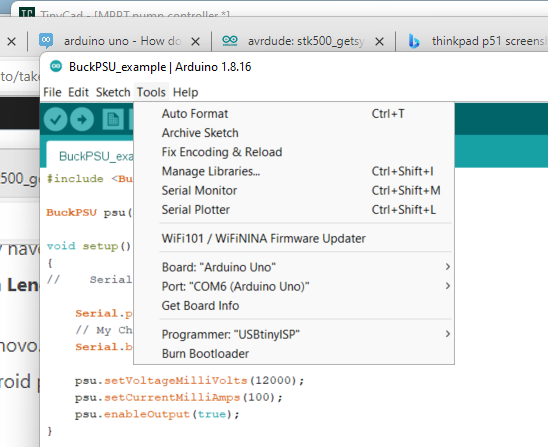
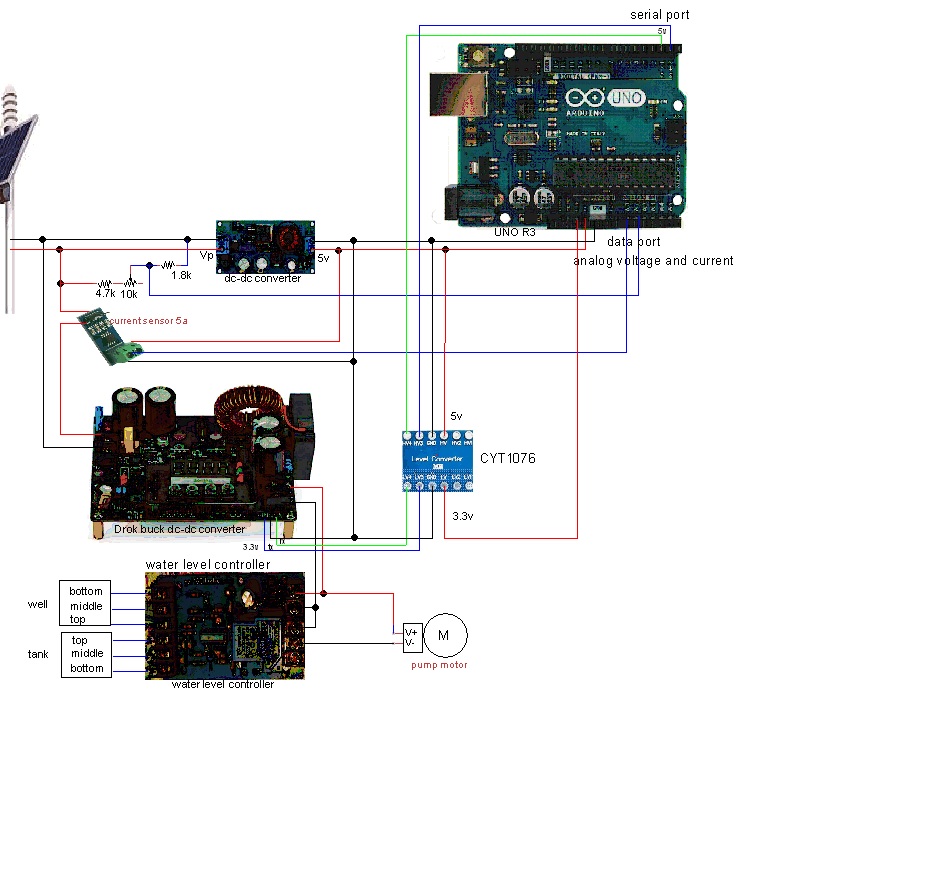
February 17, 2022 at 9:48 pmPost count: 0Please clarify what you mean by “current setting”. Since I am sending commands from an Arduino Uno R3 microcontroller to the 200310 buck dc-dc converter through a serial connection, the only screenshot I can send to you is of the Arduino Uno R3 IDE configuration. The test script successfully uploads and executes, showing transmitted commands on the serial monitor, but no responses from the 200310. Is my 200310 broken?
 Sidney
March 4, 2022 at 7:03 pmPost count: 0
Sidney
March 4, 2022 at 7:03 pmPost count: 0I bought another 200310 dc-dc power supply to be sure that the serial port is good, and connected it in my project as shown in the drawing above, shifting the Uno serial port 5v logic levels to the 200310 3.3v levels. Then I connected a logic analyzer to the Tx and Rx pins on the 200310. Running the test sketch shown above, I find that the commands sent on the Uno Tx line correctly arrive at the 200310 Rx pin, but there is no response on the 200310 Tx pin. I get the same result at 4800 baud and 9600 baud, and when I swap the Tx and Rx lines. The 200310 otherwise functions properly, ie, I can use the buttons to set the output voltage and limit the output current. Why isn’t the serial port working?
Please suggest a way forward.
 Frank Hellmann
March 13, 2022 at 3:59 pmPost count: 0
Frank Hellmann
March 13, 2022 at 3:59 pmPost count: 0 Thanh
November 20, 2022 at 9:50 amPost count: 0
Thanh
November 20, 2022 at 9:50 amPost count: 0Thank you so much for your answer here Frank.
I just recently bought a 200310 module as well. I’ve been trying to test the UART communication for 2 days and it didn’t work.
I have a USB-UART TTL adapter plugged onto my PC. The USB UART TX pin is connected to the T pin. I’m using a terminal program (screen) to send the command out onto the T pin. I checked with an oscilloscope and saw no activity on the R pin whether I send the “aru” command on the T pin with either 4800 or 9600bps. Setting function F3 value to 00, and the serial port works after that.
May I ask where to find this information? What are F3 functions with value from 1 to 26?
The manual sheet that comes with my unit has no information about the F3 at all. What does F4 do?
Thanks so much
 SNJ
April 19, 2023 at 1:43 amPost count: 0
SNJ
April 19, 2023 at 1:43 amPost count: 0 ahoyallys235
October 31, 2025 at 1:47 pmPost count: 0
ahoyallys235
October 31, 2025 at 1:47 pmPost count: 0Hi folks! I discovered https://spino-gambino.ca thanks to an ad I saw while watching hockey highlights online in Canada. I was skeptical at first but joined out of curiosity. The slots were surprisingly good, especially the themed ones with mini-bonus rounds. I had one night where I nearly quit after losing, and then suddenly hit a combo that brought me back to profit. That rollercoaster feeling is exactly what I enjoy about it now.
 Michael81
December 20, 2025 at 9:50 amPost count: 0
Michael81
December 20, 2025 at 9:50 amPost count: 0Hey, I know how frustrating it can be troubleshooting electronics and wondering if you’ve fried a device. I actually took a break from all that stress and came across spin macho while browsing online for a quick distraction. I tried a few slot games, and after a couple of small losses, landing a decent win really lifted my mood. It turned out to be a surprisingly fun way to relax and take my mind off the technical headaches, and I’d recommend it if you need a quick break from troubleshooting.
 Amirr0123
January 15, 2026 at 5:43 amPost count: 0
Amirr0123
January 15, 2026 at 5:43 amPost count: 0<span data-sheets-root=”1″>Players often want to know how smoothly their favorite games will run before upgrading hardware. An accurate fps calculator helps estimate performance across popular games and screen resolutions using simple system details. It shows expected frame rates for 1080p, 1440p, and 4K, helping users plan settings wisely. Clear results make it easier to balance visuals and speed. With quick comparisons between GPUs and CPUs, gamers can prepare setups that deliver stable play without guesswork or wasted money. This tool supports smarter upgrades and smoother sessions for casual and competitive players.</span>
-
AuthorPosts
