

Forum Replies Created
-
AuthorPosts
-
Hello Kiet Phan,
Please check if it is this item, https://www.droking.com/0-200uA-DC-Micro-Amp-Current-Meter-Digital-Ampere-Tester-Red-Led-Display-Panel-Meter-DC-5V-Digital-Ammeter?search=100020&description=true
It doesn’t support 0-200mA. Only 0-200uA is available.
Best regards,
DROK
Hi Scott Knapp,
Please check if it is this item, https://www.amazon.com/dp/B07B4CWKRJ?ref=myi_title_dp
If you need longer cable, please find shielded wire. We are not sure if someone sell such shielded wire with xh2.54 3p connector.
If not, you can find cable and connector separately.
Best regards,
DROK
Hi,
It is not sold by DROK.
Best regards.
in reply to: DC Buck Converter #68705Hello,
As the parameters in video are different from description ,so we are not sure what wrong it is. If it is inconvenient for us to check further, all we can do is refund drieclty. Is it ok for you? Please kindly offer order ID.
Best regards.
Hi,
200211 can act as mouse, but the program is complicated based on different PC system. And the premise is that your device support shortcuts operation.
Below is a simple instruction:
Open an notepad on computer (or text editor on Mac);Close the input method then keep pressing rotary knob and connect USB cable; menu will be showed in notepad; Short press button to enter main menu (keep pressing button in MAC system);
Then you can turning rotary knob or press it to set shortcut key for different custom actions.
There are over 160 keys for choice.
Hi,
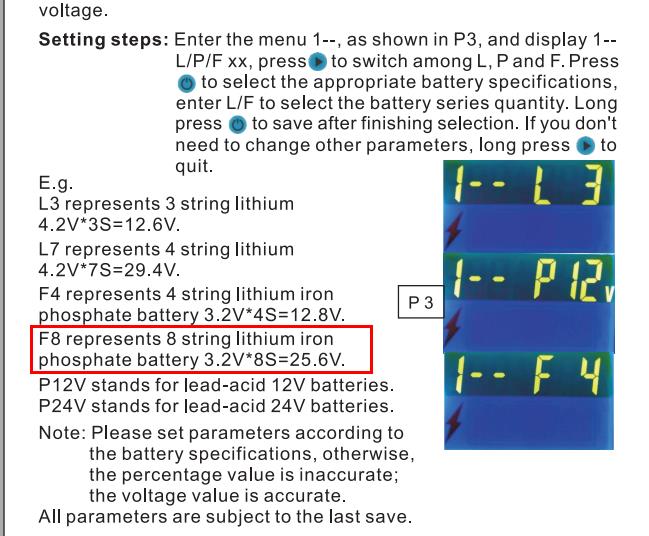
In this program, one lithium iron is 3.2v. You need to confirm the totalt battery voltage. As shown in our instructin, if it the maximum battery voltage is 48v, you can just set F 15 (3.2v*15s)
Best regards,
DROK
in reply to: Display does not switch on #68601Hi Selwyn Oster,
We think it should be this item, https://www.amazon.com/dp/B089SR5D7P?ref=myi_title_dp
When jumper is on J3, item draws power from “+VEXT- “port instead of “V+,V-” port. You have to connect power supply to Vext port.
Or please move the jumper to J2. In that case, item is powered by measring circuit, but it can only measure DC6-75V voltage.
in reply to: DC Buck Converter #68597Hi Robert,
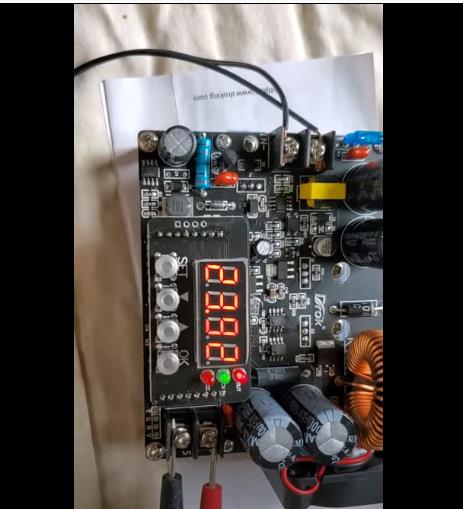
What is the maximum voltage from the 60v power supply?
From your video, it seems output is around 23.92v instead of 57v. Did you change input source?
And we found the LED display keep flashing, is it normal actually?
Best regards,
DROK
in reply to: Drok 10-100v Programmable Battery Meter #68588Hello Wes
Please check your battery type. Assume it is 48v lead-acid, you can choose P48V.
Best regards.
in reply to: DROK 200446 – can't change current #68580Hello D Avona,
There are no items can’t regulate current like voltage adjustment. It is impossible to force a load to draw more current.
Best regards,
DROK
in reply to: DC Buck Converter #68464Hello Robert,
Could you please check if it is this item? https://www.amazon.com/dp/B08LPVWX74?ref=myi_title_dp
To check what wrong it is, would you like to show us the operation by video? You can share a video link here or send it to service@droking.com
Best regards.
in reply to: DROK 200446 – can't change current #68463Hello D Avona,
Can you regulate current when short the output terminal? Please kindly notice converter can only set a limit for current. Actual output current mainly depends on load.
Assume output current is set as 2A, load only draw 1A, actual output current is just 1A. But it will not draw more than 2A in that case.
Best regards,
DROK
in reply to: Drok 10-100v Programmable Battery Meter #68462Hello Wes,
If you want to program battery type, please program menu 1 or menu3.
Menu 5 is for votlage reading calibration. When thre is large error, you can enter calibrate voltage reading.
Best regards.
Hello Jocelyn Arsenault,
We have pdf manual on Amazon product details page, please feel free to download it.
Here is the link, https://m.media-amazon.com/images/I/D1RL1hEmgTS.pdf
Best regards,
DROK
-
AuthorPosts
