

Forum Replies Created
-
AuthorPosts
-
in reply to: External NTC temperature sensor #35152
Hello David Smith,
Thanks for writing in.
We think it should be this item. 2001710003
You can extend the sensor wire.
Any more questions, please let us know.
Best regards.
Hello Franck,
“-LoC” means you lock the button. Please turn off output andpress SET to switch to current parameter; Then hold the “OK” until it shows “ULoC”
Best regards.
in reply to: Product Code: 200317 #35147Hello Nicholas Olsen,
The input range is DC 12V-24v. Any more questions, please let us know.
Best regards,
DROK
in reply to: Digital Tester 4in1 AC #33681Hello Herve Pugin,
This item can only work with original CT, which is precision one.
Any more questions, please let us know.
Best regards.
Hello Bacinger,
Thanks for writing in. Please check if it is this item 200141
If it is correct, please try to calibrate it.
1. Turn off the power supply.
2. Connecting power supply (20V/10A), shunt and load.
3. Connecting the two calibrating spots (Open the back cover, you will find two holes which
marked “W” )
4. Turn on the power supply.
5. When the screen display changed from “CAL—“ into” —PASS”, that means the calibration is finished.Best regards.
in reply to: 124802L low power output #33677Hello Lester,
Thanks for writing in and sorry to hear that.
To check what wrong is, could you please kindly take some images to show more details? Did you extend output cable?
If you can’t upload pictures here, please kindly send it to service@droking.com.
Best regards.
Hello sandra,
We can supply products to compenies in China. Please feel free to cotnact us through Service@droking.com.
Best regards.
Hello Doug Andersen,
Thanks for writing in.
Would you please tell us which item it is? If you can, please kindly send us ASIN number or product link.
Best regards.
in reply to: manuals for your product #33672Hello sudhanshu kumar,
Here is instruciton for 090644, https://www.droking.com/cs/wp-content/uploads/2018/10/090644.pdf
Best regards.
in reply to: manuals for your product #33670Hello John Lane,
Here is instruction for 090118
https://www.droking.com/cs/wp-content/uploads/2018/04/090118.pdf
Best regards.
in reply to: Digital time-delay relay. SKU300455 #32692Hello Matti,
Long press SET button, then enter into parameters setting mode. There are two groups of parameters for the users to choose, P0, P1. In the current mode, short pressing SET button can switch the parameter groups between P0 and P1. In each mode, you can press ↑button or ↓button to adjust the working mode you need.
P0-0: The timing mode of T1 is second.
P0-1: The timing mode of T1 is minute.
P0-2: The timing mode of T1 is hour
P1-0: After T1 time delay, the relay pulls in.(T1 timing)
P1-1: After T1 time delay, the relay releases.(T1 timing)
P1-2: After T1 time delay, the relay pulls in (T1 timing). Then after T2 time delay, the relay releases (T2 timing).
P1-3: After T1 time delay, the relay releases (T1 timing). Then after T2 time delay, the relay pulls in (T2 timing).
P1-4: After T1 time delay, the relay pulls in (T1 timing). Then after T2 time delay, the relay releases (T2 timing) and repeat the cycle.
P1-5: After T1 time delay, the relay releases (T1 timing). Then after T2 time delay, the relay pulls in (T2 timing) and repeat the cycle.Example: someone need to turn on after 10 seconds, then turn off after 20 seconds and repeat the cycle.
The setting method is as following:
T1 is set to 10 and T2 is set to 20
Choose P0-0 (The timing mode of T1 is second.)
Choose P1-5 (The working mode of the relay is working firstly then stopping working and then repeating the cycle)If there are any more questions, please let us know.Best regards.in reply to: SKU:200150 #32247Hello Yukikazu Tamura,
Tahnks for writing in.
Regarding to set current and voltage, please refer to this instruction. 200150 instruction
Any more questions, please let us know.
Best regards.
in reply to: Step up Converter #32242Hello Glen,
Thanks for writing in.
For such large input and output, we don’t have product can meet your need. It need to be customized.
Please kindly contact us via service@droking.com.
Best regards.
in reply to: Thru-Hole Test Connectors? #32215Hello William Brutzman,
Thanks for writing in.
This item only have bonding pad for wiring. If you don’t want to weld test leads, you can try to weld a block terminal firstly.
Best regards.
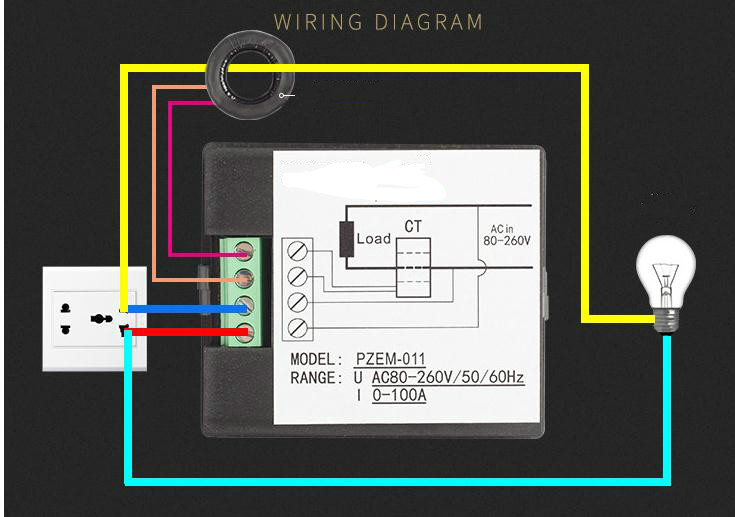
in reply to: just reads zero #30806Hello David S. Altonson,
If the wiring diagram on meter is not clearly, please refer to the following one.
-
AuthorPosts
