

Forum Replies Created
-
AuthorPosts
-
in reply to: VAH45020S Bidirectional DC Multimeter #70996
Hello Tom k,
Are you talking about this item? https://www.amazon.com/dp/B089SR5D7P?ref=myi_title_dp
This item can’t detect battery capacity, you need to program BAT (the total battery )and BPC (percentage of remaing capacity ) in advance. Did you program these two parameters?
There are no setting to change current direction but change connection. Display will turned off automatically.
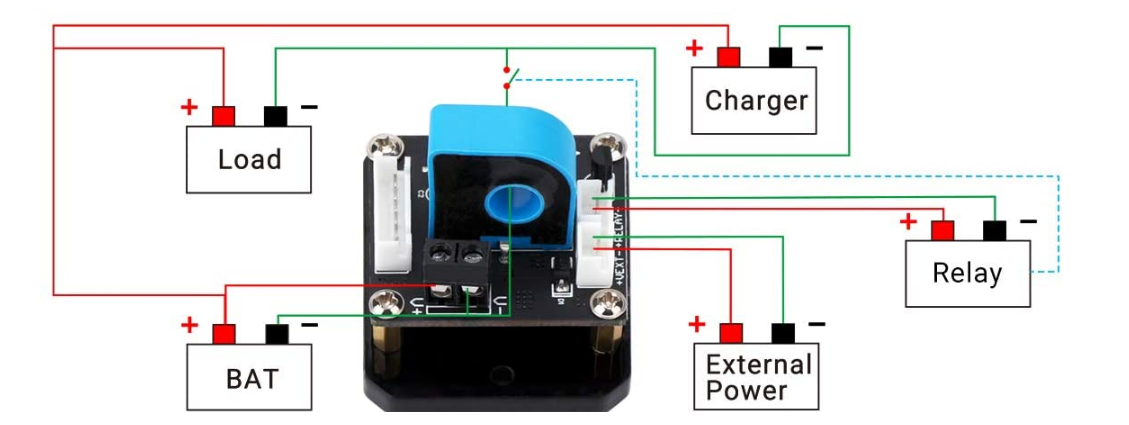
And if you want to control output on/ off , please connect relay as per below wiring diagram.
 in reply to: Electronic Thermostat Controller #70804
Hello Tevin,
Please send video to service@droking.com
And we mean the DC working voltage/current for controller. 110V should be for your load.
Best regards.
in reply to: Electronic Thermostat Controller #70676Hi,
Sorry, would you like to show us how it is by video? And how large is the working voltage/current for item?
Best regards.
in reply to: Meter stuck at 100% #70437Hi Les Standiford,
Please check if it is this item. https://www.amazon.com/dp/B07759SLYP?ref=myi_title_dp
Did you program battery type? If it is 36 lead-acid, you should select “P36V” in menu 1.
Here is pdf manual, https://m.media-amazon.com/images/I/B1Z5kTp++9S.pdf
Best regards,
DROK
in reply to: 200536FBA setup #70436Hi
Did you try below current calibration? And for 300A scale, there may be larger error for small current. The meter scale should be closed to actual current.
Charging /discharging current calibration:
- Hook it up according to the charging/ discharging wiring diagram.
- Set the power supply as above 12V, then hold the OK button and power the meter simultaneously. Hold “OK” for 3 seconds and then release. It will come to parameter setting;
- Please move yellow cursor to “Mode” and short press OK button, then move the yellow cursor to “+4.A”(It is “-4A” in discharging mode). In that case, please make sure the actual load current is over 1.00A. Next, please press up or down button to adjust the current reading of meter until it is the same as actual load current. After that, press OK to move yellow cursor to ”Save” and save the calibration.
At last, power off and then power on again.
in reply to: Electronic Thermostat Controller #70432Hi Tevin,
Sorry, there is no such operation to turn on/off display.
in reply to: Electronic Thermostat Controller #70332Hello Tevin,
Would you like to offer a product link or SKU number so that we can confirm which item it is?
in reply to: 200536FBA setup #70331Hello Jordan,
It can’t decent remaining battery capacity. You need to program OAH parameter. The capacity percentage= (actual AH value/ setting AH value)*100%
Do you check whether the charging current flow through current transformer?
Best regards.
in reply to: 2001711007 settings #70327Hi,
We have replied to your email. It should be caused in low input power. Please check the email for more details.
in reply to: 300473 Unexpected functionality #70099Hi,
Do you mean the power for relay goest out? Would you like to show how it is by video? You can share video link nere or send it to service@droking.com
Best regards.
in reply to: 2001711007 settings #70097Hello,
1. Without load, please short the output port with heavy cable or multimter probe. Then you can set a current limit value.
2. To check your problem quickly, it would be appriecated if you can show the operation by video. Sometime text description may cause misunderstanding an we will msis some operation details.
3. As you mention when adjusting current, voltage is also changed, so we want to let you know constant current and constant votlage can’t work simultaneously. To make it more easier to understand, we offer a sample of battery charging as reference. It mean these two working mode can’t work simultaneously.
in reply to: 2001711007 settings #69990Hello Jay Doubleu,
Would you like to show us your operation by video? Before connecting load, you can connect input power and set the output voltage/current.
Regarding current adjustment, if there is no load, you can just short the output terminal and then regualte current potentiometer. Notice: Please don’t adjust voltage when output ports is shorted.
In addition, no matter which kind of converter it is, current adjsutment and voltage adjustment can’t work simultaneously.
When load current is over the preset limit value, constant current status is enabled (CC light is on). In that case, the constant voltage component is disabled, so output volage will be changed.A typical example is battery charging. You can only charge battery with constant current and then constant voltage. But the option to charge battery with both constant current and constant voltage is infeasible.Best regards,DROKin reply to: 2001711007 settings #69879Hello,
Is the 50Ah battery bank as input power supply? Please kindly notice output current depends on load.
2.5A should be the rate current battery can offer, but it doesn’t mean output current is 2.5A all the time.
Converter only set a limit for load current. It can’t decide how much current the load should draw. For example, preset outout is 2A, but load only request 1A, actual output is just 1A. When load current is over 2A, it will limit it to 2A.
About your last problem, would you like to show us how it is by video? You can share a video link here or send attachment to service@droking.com
Best regards,
DROK
in reply to: VAC8010F-80V non-functioning KWH display #69877Hello Aroen,
May I know which item it is?
-
AuthorPosts
